Interface description
the following describes the vue integrated video plug- in interface.
1, load plug- in file before use
| File | Download address | Description |
|---|---|---|
| cmsv6player.min.js | https://v7.cmsv8.com/808gps/open/player/cmsv6player.min.js | Script file for video plug- in |
| libcmsv6decode.wasm | https://v7.cmsv8.com/libcmsv6decode.wasm | Video plug- in wasm file for h265 video decoding |
Integration Description
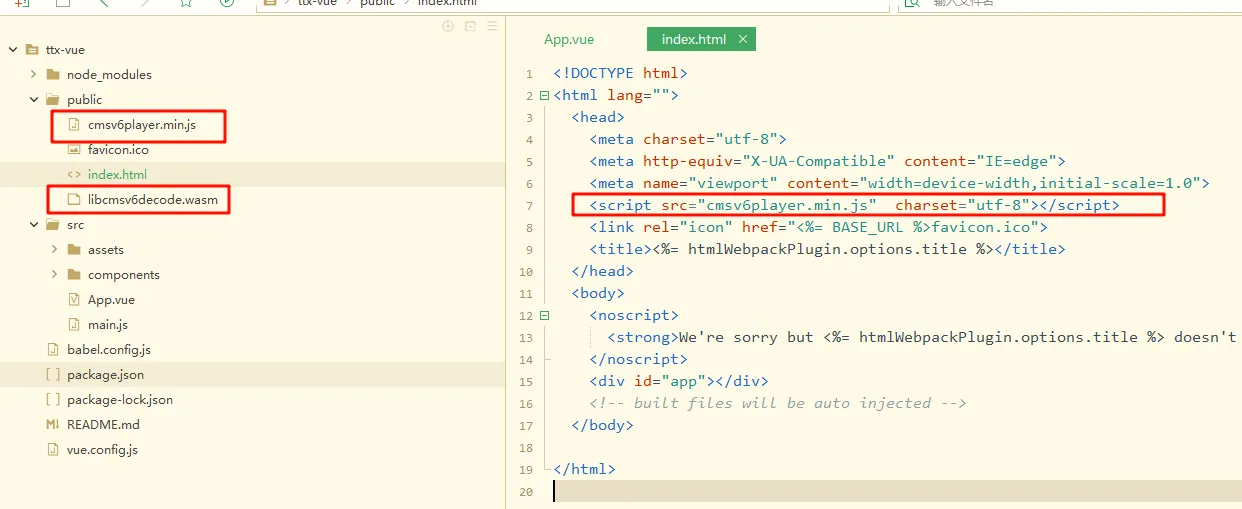
(1) Put the 'cmsv6player.min.js' and 'libcmsv6decode.wasm' files into the/public directory
(2) Introduce the 'cmsv6player.min.js' file into the index.html file
Operation example:
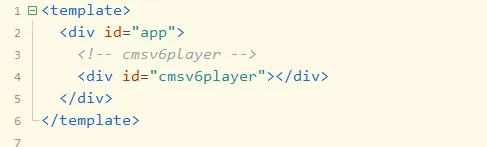
2. Set the div tag in the vue template as the container of the player
<div id="cmsv6player"></div>
3. Initialize plug- in
let videoOption = {
domId: 'cmsv6player', // id
isVodMode: false, // display progress bar, live false playback true
width: 400, // window width
height: 400,// window height
lang: 'zh', // language type
}
// Initialize the player
let swfobject = new Cmsv6Player(videoOption)
4. Example of integrated real- time playback operation
// Check jsession
let jsession = '36FD49EE0B23EFA8A77EA1ECC312B6F2 ';
// Equipment number
let devIdno = '200115000002 ';
// specify which channel
let chnNum = 0;
// set the server ip address of the video plug- in
let serverIp = '127.0.0.1 ';
// Log on to the server port
let serverPort = '6605 ';
// main or sub- stream, 0: main stream, 1: sub- stream
let stream = 1;
// Number of windows
let winNum = 4;
// window subscript
let winIndex = 0;
// Configure the number of currently displayed windows
swfobject.setWindowNum(winNum);
// Set the server ip address and login port of the video plug- in
swfobject.setServerInfo(serverIp, serverPort);

// stop playing
swfobject.stopVideo(winIndex);
// Play video serial number, session number, device number, channel number, code stream
swfobject.startVideo(winIndex, jsession, devIdno, chnNum, stream, true);
// Plug- in callback event
swfobject.addEventListener('onTtxVideoMsg', (index, type) => {

});
5, test real- time playback sample code
See the document attachment to download the file "ttx- vue.zip"
