1. Functional Description
There are two situations in which the server authorizes multiple public network IP. One is that the public network IP of the access network is inconsistent. The other is that the public network IP will change dynamically.
2. Operating Instructions
2.1 access network IP inconsistent
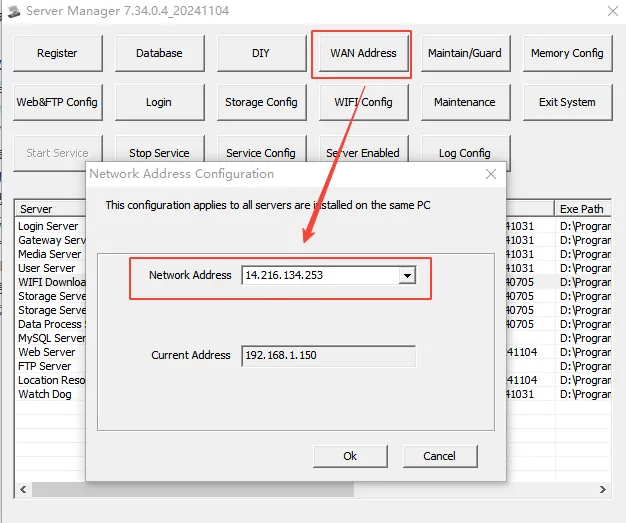
Although there are two IP's in this situation, they are fixed. You only need to install the server software, automatically identify the public network IP through the server software, and then report the IP to our company to authorize relevant business personnel for authorization. The public network IP automatically recognized by the server software can be viewed in the "network address configuration" of the server software, as shown in the following figure
After the authorization is completed, the business personnel will notify the customer that the authorization is completed. The customer will click "Software Registration" on the server software to refresh automatically. After the refresh is successful, the authorized quantity will be checked.
2.2 Server Public IP Dynamic Change
- The server is floating IP, which easily leads to authorization failure. Therefore, the customer is required to use a fixed IP for authorization. If the public network IP is to be fixed, the customer is required to find a network operator for processing.
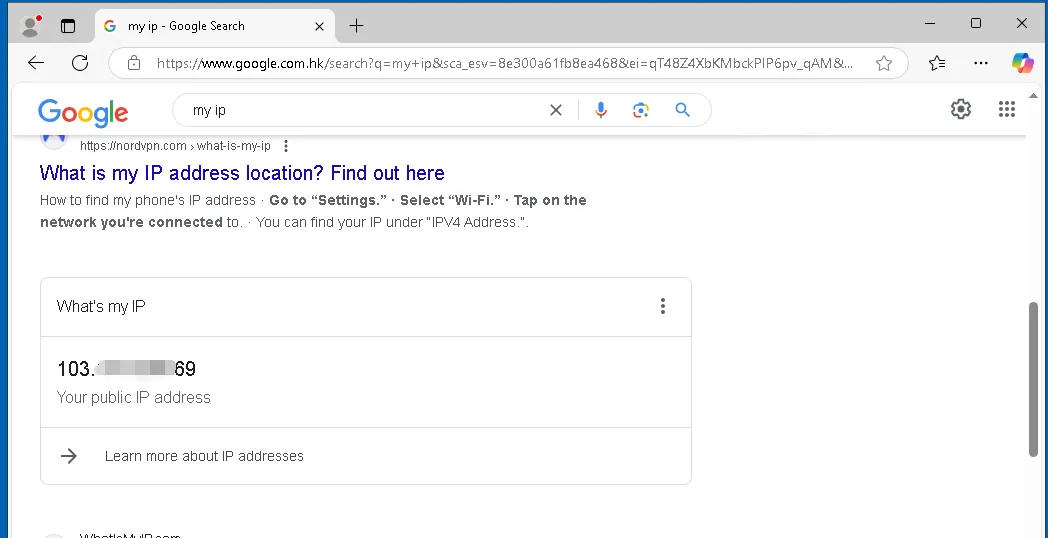
- The server has fixed two or three public network IP's at the same time. The customer needs to collect all public network IP information that the server will use in advance. The collection method can refer to the first case and needs to be operated at regular intervals to ensure that all IP's that will be used are collected. You can also enter IP in the browser search box to query the current public network IP. You need to operate it every once in a while to ensure that the collection is complete.
- After IP collection is completed, Ip information will be sent to our authorized business personnel for authorization. After authorization is completed, the business personnel will notify the customer that the authorization is completed. The customer will click "Software Registration" on the server software to automatically refresh. After the refresh is successful, the authorized quantity will be checked (this authorization method is not recommend).
