1. Feature Introduction
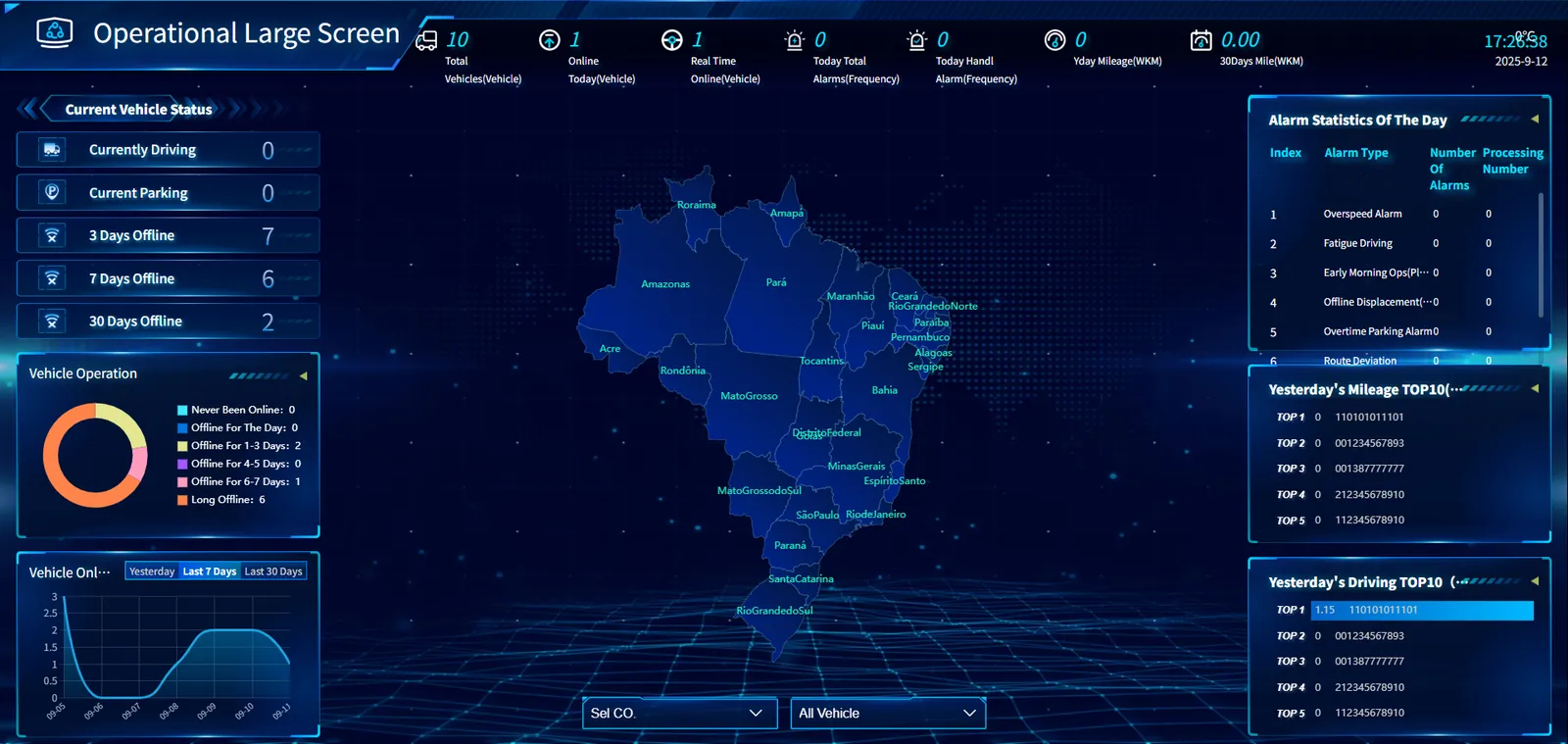
The large operating data monitoring screen provides users with a comprehensive and intuitive operating monitoring platform by integrating key indicators such as basic vehicle information, operating status, alarm data and mileage duration. Users can understand the distribution of vehicles, on- line conditions, alarm details, mileage and duration of data in real time, so as to effectively manage vehicle operations, discover and handle abnormal situations in time, and optimize operation strategies.
a. Top information bar
- Key statistics: displays the total number of vehicles, the number of vehicles on the line today, the number of real- time online vehicles, the total number of alarms on the day, the number of alarms processed on the day, yesterday's mileage, the mileage of the last 30 days, and the current time and date. These data provide an overview of the overall operation.
b. Left Ribbon
-
Current vehicle status:
Number of vehicles currently in motion
Number of currently parked vehicles
Number of vehicles offline in 3 days
Number of vehicles offline in 7 days
Number of vehicles offline in 30 days -
Current vehicle operation: A circular graph is used to display the distribution of vehicles in different operation states, including never- on- line, offline on the same day, offline for 1- 3 days, offline for 4- 5 days, offline for 6- 7 days, and long- term offline.
-
Vehicle launch trend: The line chart shows the change trend of the number of vehicles launched in the past day, nearly 7 days, and nearly 30 days to help users understand the dynamic changes of vehicle launch.
c. Central Map
- Each province is marked to visually display the distribution of vehicles in the country, so that users can understand the operation coverage and the distribution of vehicles in different regions.
d. Right Ribbon
- Alarm statistics of the day: list the alarm type, alarm number and processing number in the form of a table, including overspeed alarm, fatigue driving, early morning operation alarm (platform), offline displacement (platform), overtime parking alarm, route deviation alarm, etc., to help users understand the alarm details of the day.
- TOP10 yesterday's mileage ranking: List the top ten vehicles and their mileage yesterday.
- TOP10 of yesterday's driving time: List the top ten vehicles and their driving time.
e. Bottom function bar
- Select Company: provides a drop- down menu for company selection, and users can filter to view the operating data of a specific company.
- All vehicles: A drop- down menu for vehicle filtering is provided, and users can choose to view operating data for specific vehicle types.