1. Feature Introduction
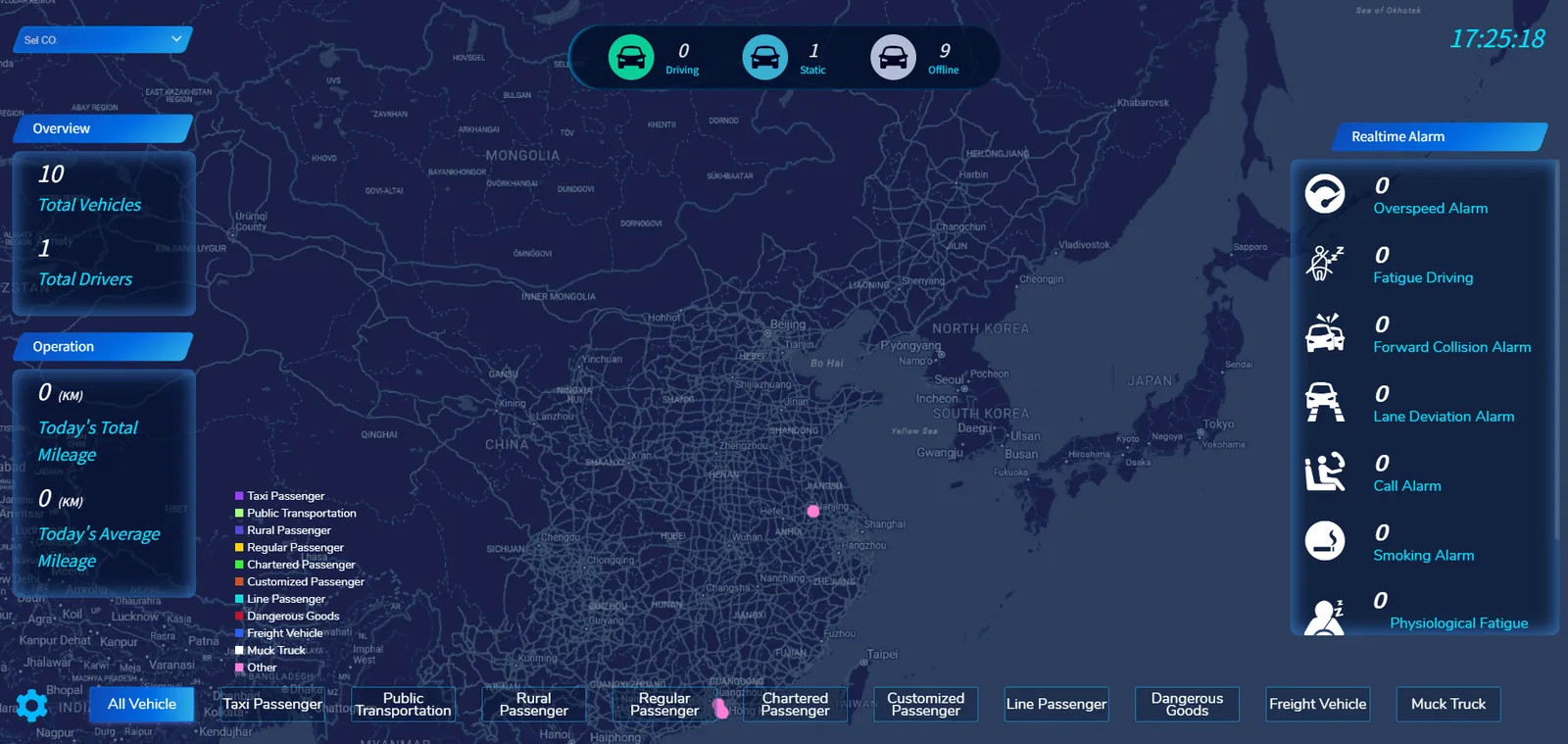
The cloud screen interface provides a comprehensive and efficient monitoring and management platform for vehicle operation managers through intuitive visual display and detailed data statistics.
a. Top information bar
- Display the current time and vehicle status statistics, including the number of driving vehicles, the number of stationary vehicles, and the number of offline vehicles.
b. Left Information Area:
- Overview: Shows the total number of vehicles and the total number of drivers.
- OPERATIONS: Shows today's total mileage and today's average mileage.
- Vehicle type legend: Indicate the vehicle types represented by different colors, such as taxi passenger transport, bus passenger transport, rural passenger transport, etc.
c. central map display area
- With the map as the background, mark the vehicle position with different colored dots, and the colors correspond to different vehicle types. Through the map, the distribution and operation range of vehicles in the whole country can be seen intuitively.
d. Right real- time alarm zone
- Real- time display of various types of alarm information and the number of support to customize the need to display the alarm type.
e. Bottom ribbon
- Company selection and vehicle screening: You can select the company through the drop- down menu, and filter different types of vehicles, such as all vehicles, rental passenger transport, bus passenger transport, etc.