1. Feature Introduction
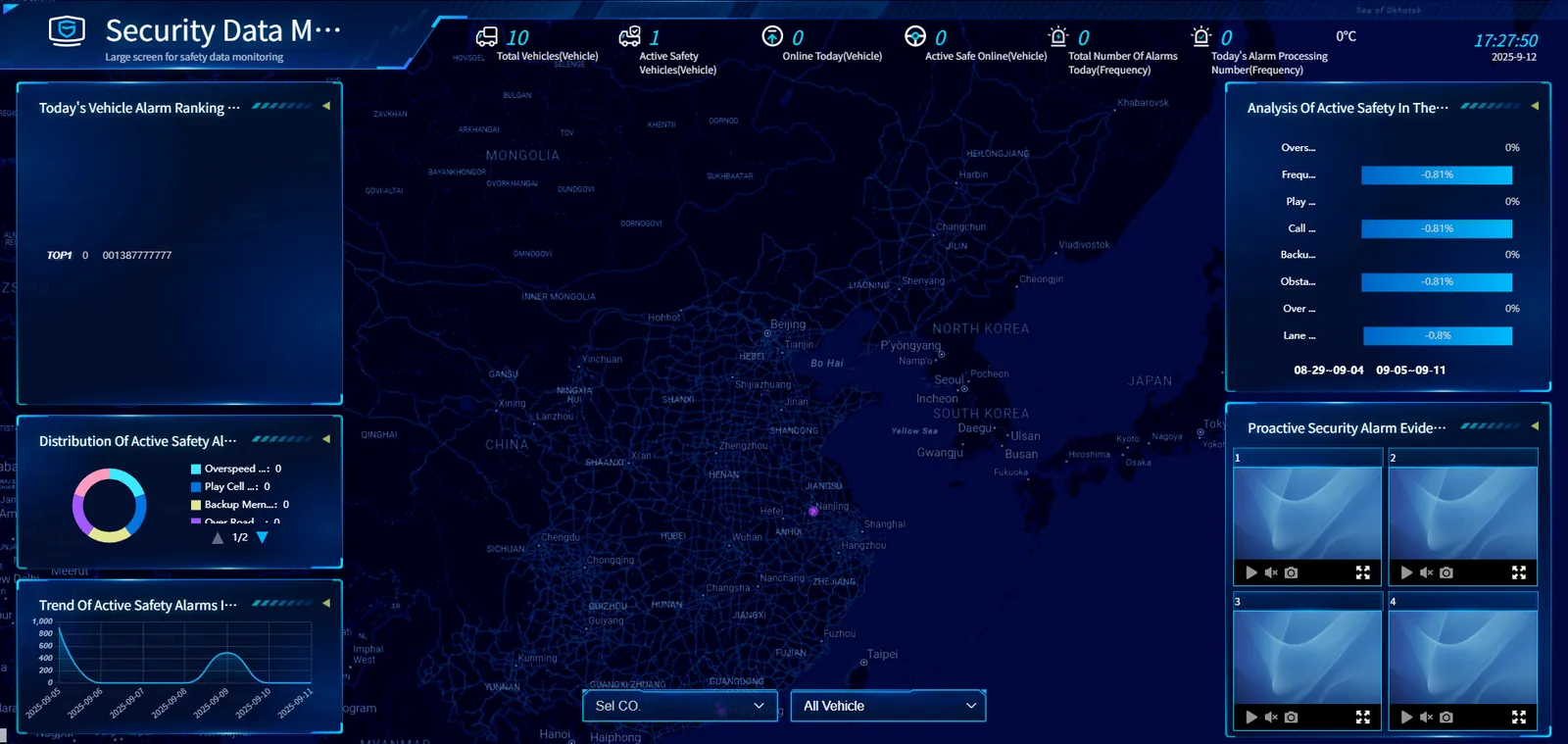
The large security data monitoring screen provides users with a comprehensive and intuitive security monitoring platform by integrating the basic information of the vehicle, alarm data and geographical distribution. Users can understand the vehicle's alarm status, alarm type distribution, alarm trend and vehicle distribution on the map in real time. At the same time, they can compare the alarm changes in different time periods and view specific alarm evidence. These features help users find and deal with security risks in a timely manner, optimize security management strategies, and improve overall security levels.
a. Top information bar
- Displays key safety data indicators, including the total number of vehicles, the number of active safety vehicles, the number of vehicles launched today, the number of active safety online, the total number of alarms today, and the number of alarm processing today. The current time and date are displayed in the upper right corner.
b. Left Ribbon
- TOP10 vehicle alarm ranking today: The top ten vehicles with the largest number of alarms on that day are displayed in the form of a list, including the number of alarms and license plate numbers, to help users quickly identify vehicles with high alarms.
- ** Distribution of active safety alarm types today: ** A circular graph shows the proportion of different types of active safety alarms, such as overspeed alarm, mobile phone play level 1, backup memory failure alarm, etc., to visually present the distribution of various alarms.
- Active security alarm trend in the past 7 days: A line chart shows the change trend of the number of active security alarms in the past week to help users analyze the fluctuation of the number of alarms.
c. Central Map
- The location of the vehicle is marked with purple dots on the map to visually display the geographical distribution of the vehicle. Below the map are drop- down menus for "Select Company" and "All Vehicles", through which users can filter to see the distribution of specific companies or specific vehicle types.
d. Right Ribbon
- Comparative analysis of active safety in the first two weeks: Compare the change percentage of different types of active safety alarms in the last two weeks in the form of a bar graph, such as the change of alarm types such as unfastened seat belt, driving assistance function, and right rear approach.
- Active safety alarm evidence: Dynamic display of vehicle active safety alarm pictures. The license plate number and alarm type (such as lane departure alarm level 2) are marked below each picture to provide users with specific evidence and detailed information of the alarm.