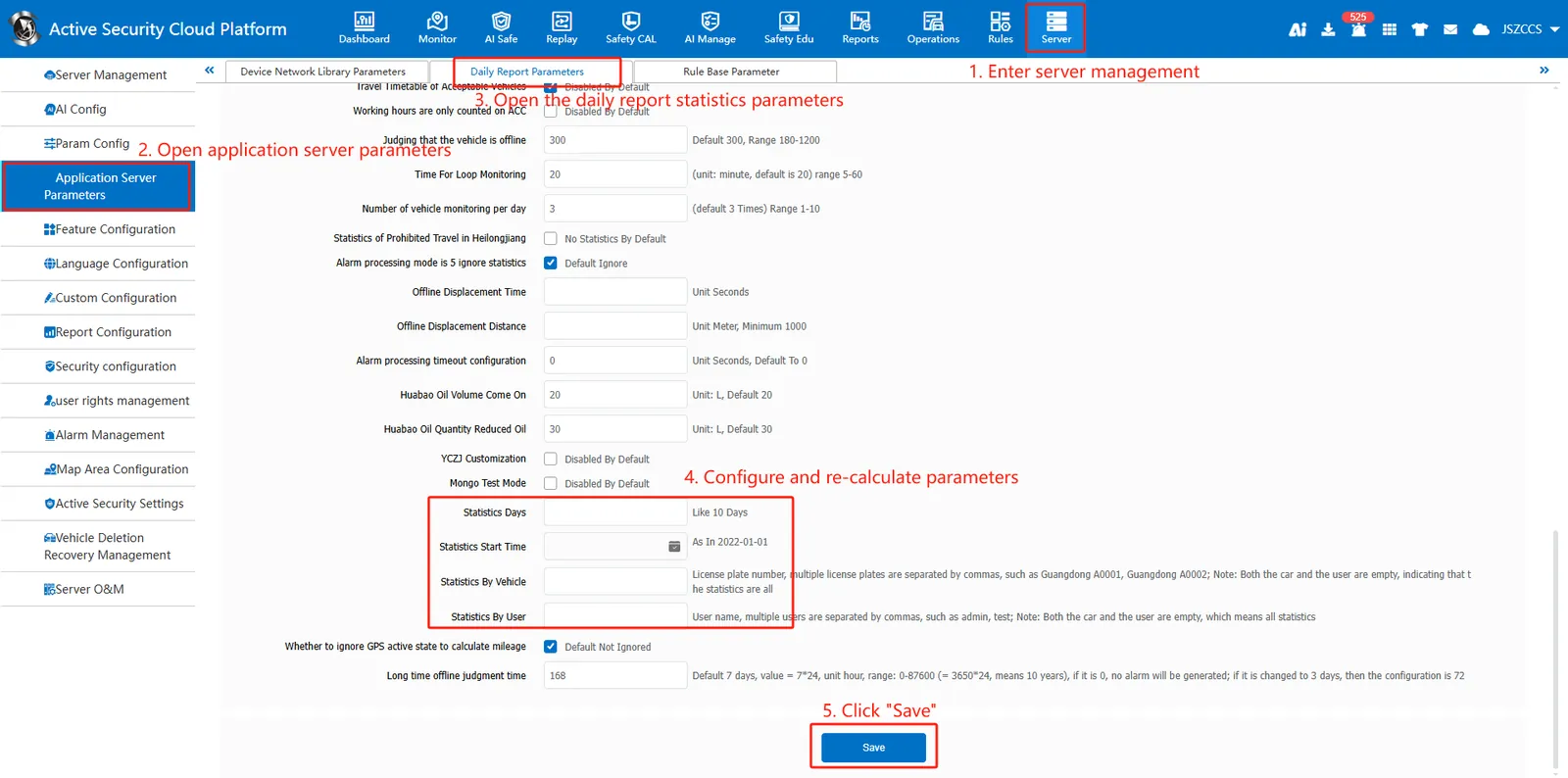
1. Function description
The following methods can be used for re- statistics, such as inaccurate mileage data due to GPS supplementary transmission of equipment, inconsistent alarm disposal rate verification due to non- same- day alarm processing, etc.
2. operating instructions
2.1 function entrance
Log in to the admin administrator account and open **[Server Management]> [Application Server Parameters]> [Daily Report Parameters]. **
2.2 configure recalculating parameters
a. on the configuration page, enter statistics days, statistics start time, statistics by vehicle or statistics by user, and click "save" to refresh the page.
For example, if the data from April 1, 2025 to April 5, 2025 are re- counted, then the number of days to be counted is 5, and the statistical start time is April 1, 2025.
B. successful saving will take effect. the completion time limit is determined according to the server vehicle data. ** the more vehicles are counted, the longer it takes. The longer the statistical days, the longer it takes **.
C. manually refresh the configuration page, you will find that the number of statistical days will become smaller and smaller, which means that re- statistics are being executed normally, waiting for all statistical parameters to be cleared, which means that re- statistics have been completed.