1. Function description
- 7.35.1 version began to support the server running health self- check function.
- Server operation and maintenance personnel can customize the threshold of each alarm parameter.
2. operating instructions
- Enter [Server Management]> [Server Operation and Maintenance]> [Server Self- Test]. By setting relevant thresholds, the server regularly performs operation inspection, and triggers alarm information to notify technical support or customers when abnormal.
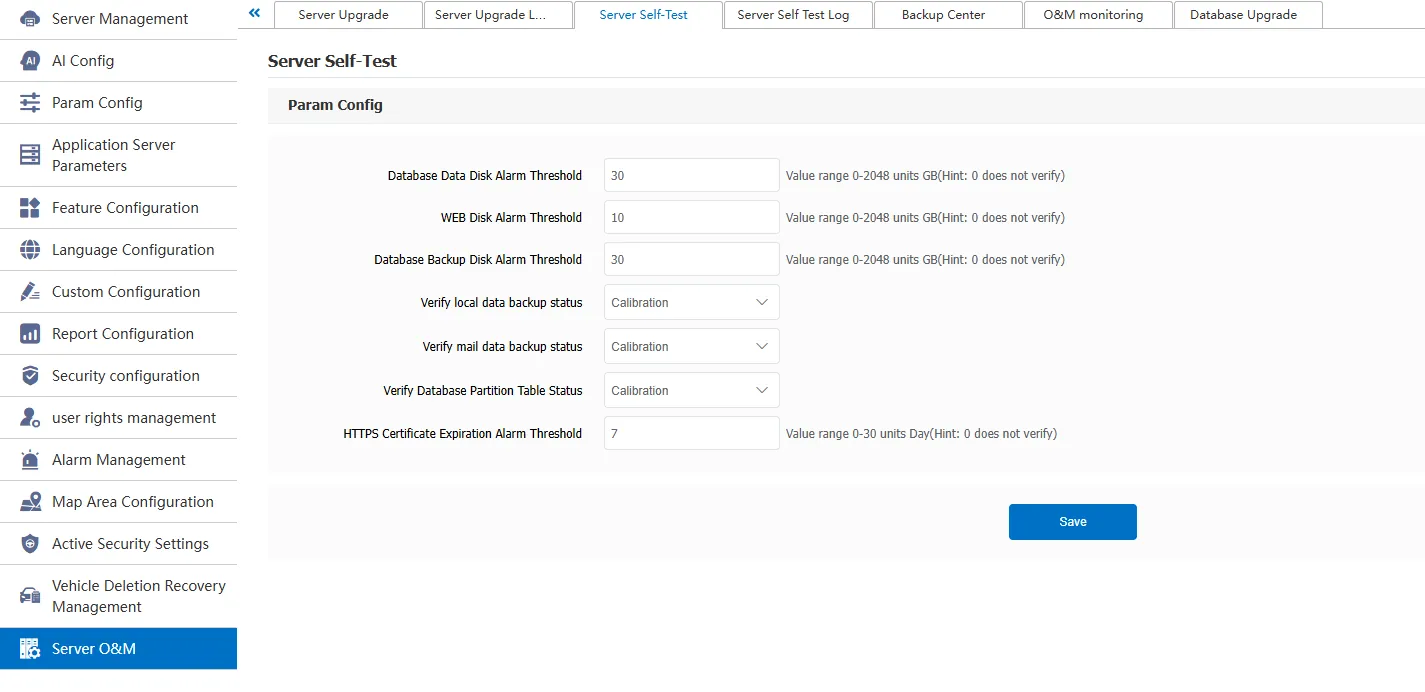
Database Data Disk Alarm Threshold: When the remaining space on the disk where the database is located reaches the configured threshold, an alarm is triggered.
WEB disk alarm threshold: The remaining space of the disk where Tomcat is installed reaches the configured threshold and the alarm is triggered.
Database Backup Disk Alarm Threshold: When the disk to which the big data automatic backup path belongs and the remaining space reaches the configured threshold, an alarm is triggered.
Check the backup status of local data: The automatic backup status self- check of the server indicates that the check is on. If the check is not on, it indicates that the check is off.
Check the backup status of mail data: Check the backup status of mail. Check indicates that the backup status is on. If the backup status is not checked, check indicates that the backup status is off.
Check the status of the database partition table: Check the status of the database partition table. If the check is enabled, the check is disabled. If the check is not enabled, the check is disabled.
HTTPS certificate expiration alarm threshold: SSL certificate expiration time reminder, which can be ignored by servers that do not use HTTPS
3. Precautions
A. the server that opens VIP checks itself once a day; Non- VIP servers once every three days