1. Function description
This document includes some manufacturers TTX equipment access platform configuration method, welcome to add!
2. operating instructions
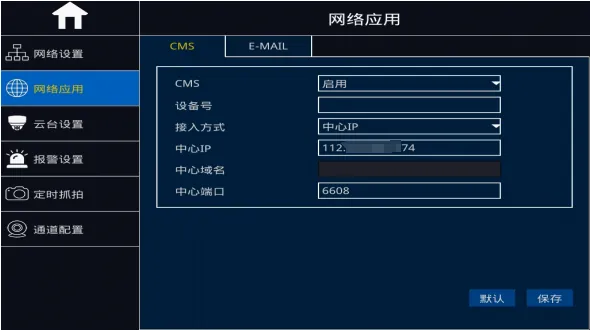
2.1 [Electricity]]
Go to Menu- > Advanced Settings- > Web Applications- >CMS
1)CMS: Select from "Enable" and "Close" provided in the drop- down box.
2) Equipment number: the corresponding configuration of the equipment number and the number on the server (provided by the manufacturer or platform operator)
3) Access method: Select from the "Center IP" and "Center Domain Name" provided in the drop- down box.
4) Center IP: IP address of the server platform (provided by the manufacturer or platform operator)
5) Central domain name: After using the central IP, this menu does not need to be configured.
6) Center port: The default port is 6608 (provided by the manufacturer or platform operator)
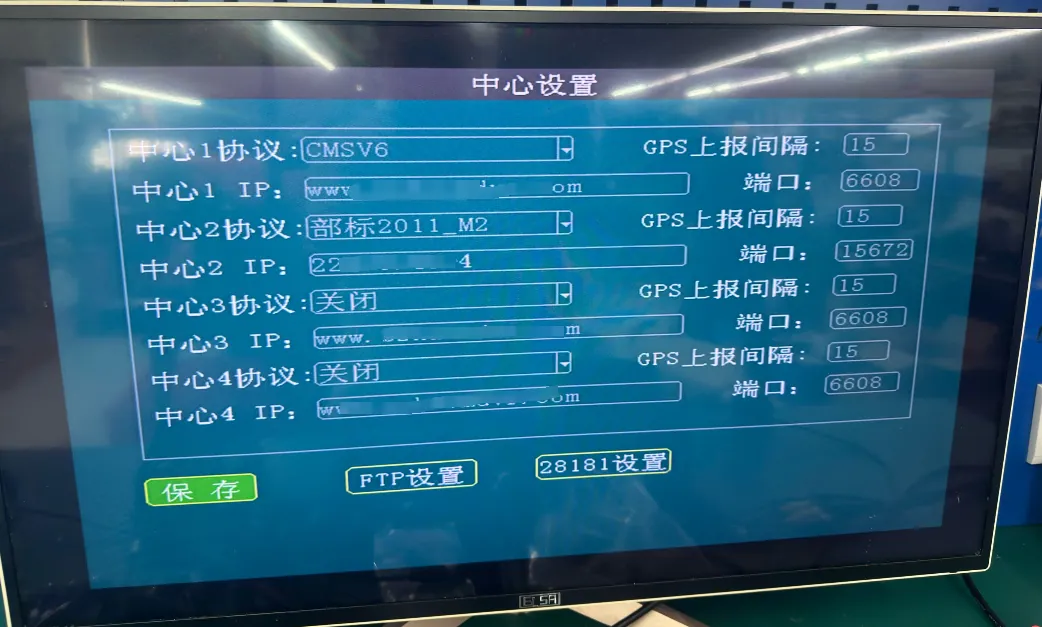
2.2 [Tongjin]]
Go to Main Menu- > Center Settings
1) Center Agreement: Select CMSV6
2) Center IP: Fill in the IP address or domain name address (provided by the manufacturer or platform operator)
3) Center port: The default port is 6608 (provided by the manufacturer or platform operator)
4)GPS reporting interval: the default is 15 seconds
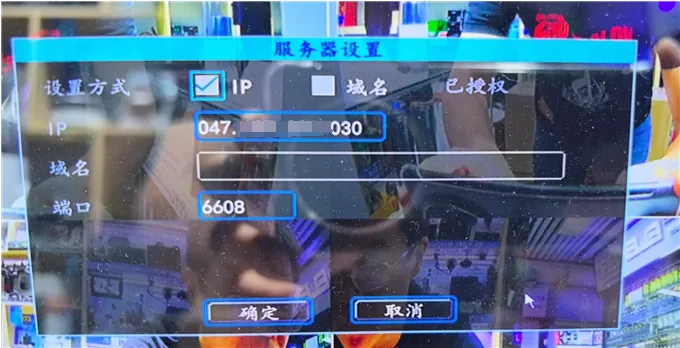
2.3 [Tongli]]
Go to Menu- > Server Settings
1) Setting method: Select IP or domain name
2)IP: fill in the IP address when selecting the IP mode (provided by the manufacturer or platform operator)
3) Domain name: fill in the domain name address when selecting the domain name method (provided by the manufacturer or platform operator)
4) Port: The default port is 6608 (provided by the manufacturer or platform operator)