1 Function description
When the vehicle initiates the intercom request, the platform will automatically pop up the intercom request window to support the user to select the vehicle and complete the intercom operation, and provide auxiliary functions such as video preview and pop- up window shielding.
2 operating instructions
2.1 intercom request window trigger
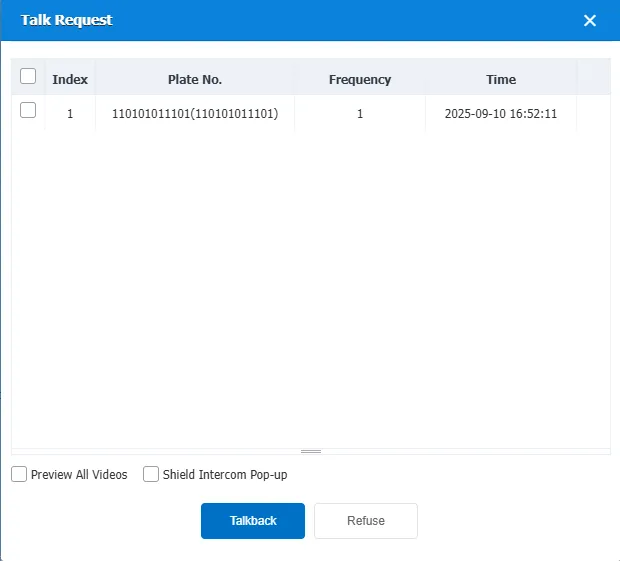
After the vehicle initiates the intercom request, the platform automatically pops up the "Intercom Request" window, as shown in the figure
2.2 select vehicle and intercom operation
Check the target vehicle in the check box corresponding to the Serial Number column
- Click [Talkback] to start a call
- Click [Refuse] to reject the request
2.3 video preview and pop- up window shielding
Video Preview: Check the "Preview all videos" checkbox → After agreeing to the intercom, the vehicle video will be automatically previewed.
Blocking pop- up window: Check the "Shield Intercom Pop-up" checkbox → Subsequent intercom requests will no longer automatically pop- up windows, you need to go through the "Intercom Request" button in the lower right corner of the platform Open the window manually.
3. Equipment docking instructions
Standard equipment actively requests intercom protocol
Extension instruction=0X3032, no message body
Message example: 7E303200001000010107000006137E
