1、 function description
Make MP4 files support playback while loading
2、 cause analysis
This small tool can view mp4 file structure information: mp4info.exe download address

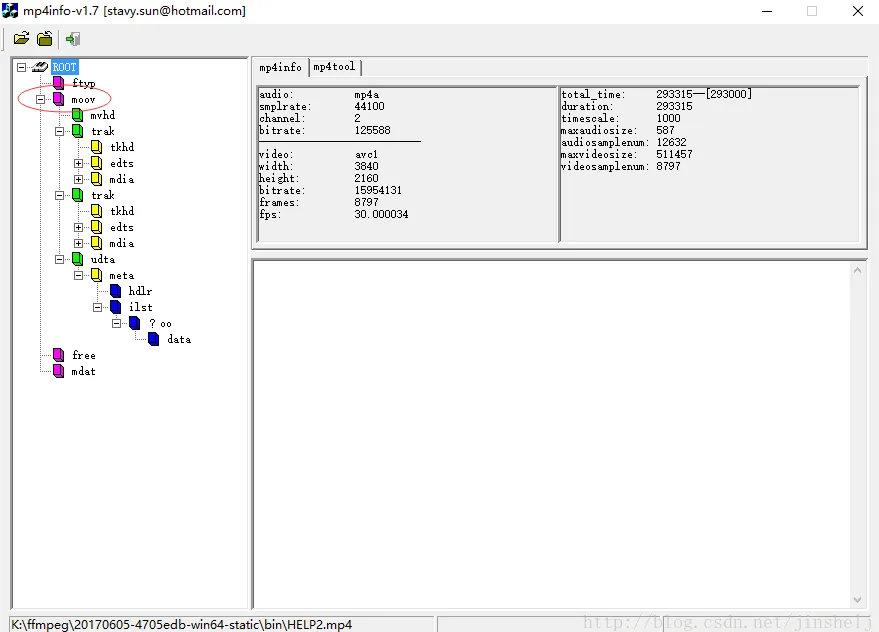
To enable the video to be loaded and played, you need to insert metaData information into the video header, that is, the data in moov- >udta- >meta in the figure above.
3、 operating instructions
3.1 download and install ffmpeg
ffmpeg download address
After downloading and decompressing, change the folder to ffmpeg and put it under the D disk.
Run three files:
- D:/ffmpeg/bin/ffmpeg.exe
- D:/ffmpeg/bin/ffplay.exe
- D:/ffmpeg/bin/ffprobe.exe
This was successfully installed.
3.2 Execute Modify metadata Command
- enter cmd in start- > run, and a command window will pop up
- Enter cd /d D:/ffmpeg/bin Enter to enter the ffmpeg directory
- Run command again: qt- faststart.exe E:/1.mp4 E:/2.mp4
(1.mp4 for the original mp4 file, 2.mp4 for the modified file)
