Function description
- When the existing vehicle icon on the platform cannot meet the customer's needs, the customer can provide the icon file for us to integrate into the platform.
- The customer can also replace the processed icon to the server, refer to the document: https://help.cmsv8.com/helpCenter/doc/index.html?isStudy=1&docType=1&docId=578&type=1替换车辆图标方法
Icon Requirements Description
- Color: red, green, pink, gray, blue, yellow, light blue
- Direction: East, South, West, North, Southeast, Northeast, Southwest, Northwest
Vehicle Icons Added- All are single small icons
Example: **
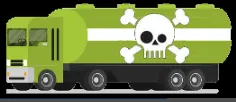
Add a set of dangerous goods vehicle icons, and the requirements are as follows
Large icon: **
Size: 32x32
Quantity: 56
Color:7 colors, each color 8, to 8 directions
Direction: 8 directions
Small icon: **
Quantity:7
Size:18x18
Color**:7 colors (front facing right)
Refer to the dangerous goods icon below
Add a set of personnel icons. The requirements are as follows
Large icon: **
Quantity:56
Size:32x32
Color**:7 colors, each color 8, to 8 directions
Small icon: **
Quantity:7
Size:18x18
Color**:7 colors, direction to the right
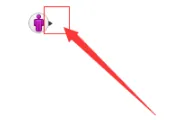
The personnel icon needs to reflect the direction, see the example below.
Refer to the following figure
Notes
- picture to png format, transparent background
