1. Function Description
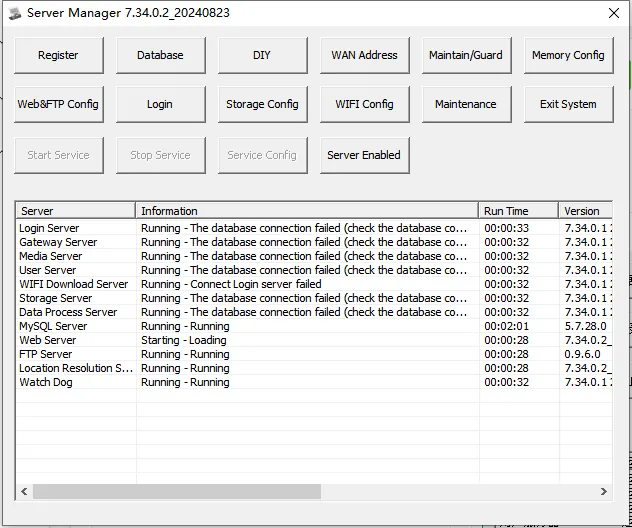
1.1 MySQL server starts normally, other servers fail to connect to the database
1.2 Using the Navicat for MySQL tool to connect to the database and report an error Can't connect to MySQL server on'localhost' (10055)
1.3 the application frequently connects to access the database, the system will dynamically allocate a port for each connection, which will lead to the situation that the dynamic port is occupied in the case of large concurrency.
1.4 the port reuse problem, each dynamically assigned port number needs to wait for a period of time before it can be reused after the connection is closed.
1.5 netstat -ano > c:1.txt run this instruction in cmd to see how many ports are currently occupied. generally, problems are easy to occur when it exceeds 5W.
2. Operating Instructions
2.1 Method 1
2.1.1 Changing the Available Dynamic Port Range
Before the modification we can CMD command
netstat - n | find /C /I "established"
Check how many connections are currently occupied
https://www.cnblogs.com/Alex80/p/15723903.html
2.1.2 Show how much the default is:
netsh int ipv4 show dynamicport tcp
netsh int ipv4 show dynamicport udp
netsh int ipv6 show dynamicport tcp
netsh int ipv6 show dynamicport udp
2.1.3 can be configured by the following command:
netsh int
For example:
netsh int ipv4 set dynamicport tcp start=9000 num=56000
netsh int ipv4 set dynamicport udp start=9000 num=56000
netsh int ipv6 set dynamicport tcp start=9000 num=56000
netsh int ipv6 set dynamicport udp start=9000 num=56000
Note: start refers to the start port, the minimum value is 1025,num refers to the range, the minimum value is 255, and the maximum value is start num < 65535
2.2 Method 2
2.2.1 Set the number of connections, ports, and multiplexing time
You can configure by modifying or adding the following registry fields:
Sometimes it may be necessary to dynamically allocate the maximum number of ports through the registry configuration:
Add the following key values to the HKEY_LOCAL_MACHINE\SYSTEM\CurrentControlSet\Services\Tcpip\Parameters:
ValueName: MaxUserPort
ValueType: DWORD
Valuedata: 65534
ValidRange: 9000- 65534 (decimal)
Default:0x2328 (9000 decimal)
Maximum TCP connections TcpNumConnections
HKEY_LOCAL_MACHINE\System\CurrentControlSet\Services\Tcpip\Parameters]
TcpNumConnections = 0x00fffffe (decimal 16777214)
Add HKEY_LOCAL_MACHINE\SYSTEM\CurrentControlSet\Services\Tcpip\Parameters
Key Value: TcpTimedWaitDelay
Value type: REG_DWORD- Time in seconds
Valid range: 30- 300 (decimal)
Default value: 0x 78 (decimal 120)
Description: This parameter determines how long the connection remains TIME_WAIT when closed. As long as the connection is TIME_WAIT, the socket pair cannot be reused.
For faster multiplexing: can be set to minimum: 30
Original link:https://blog.csdn.net/langren697/article/details/38422055
https://blog.csdn.net/weixin_30853329/article/details/98007292
https://blog.csdn.net/zhangjunli/article/details/87914000
