1. Function description
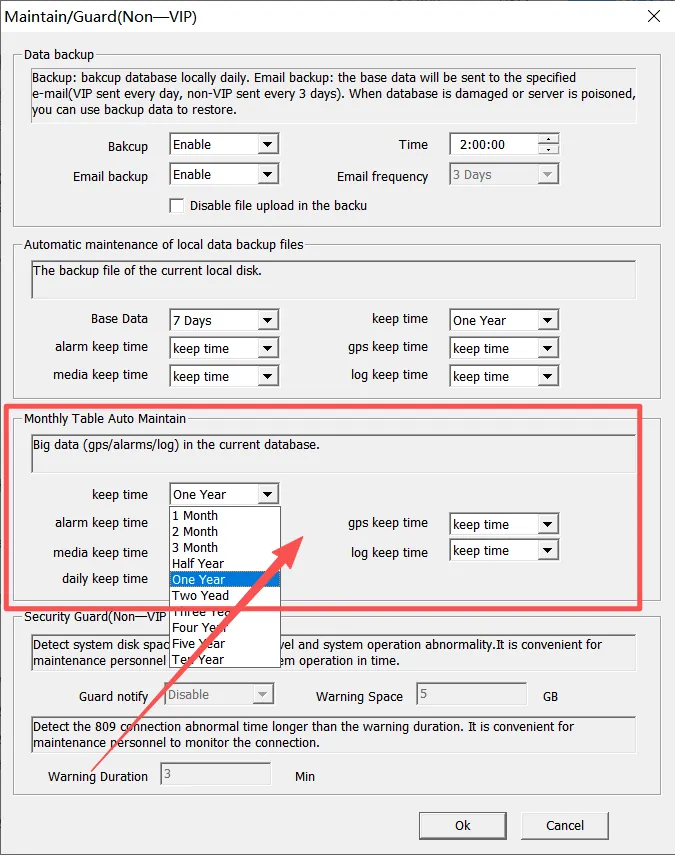
The automatic maintenance storage retention time for local data backup files and real- time database monthly table files can also be configured separately. Data exceeding the set retention time will be automatically cleaned up and deleted. Reasonable settings can reduce the pressure on disk space.
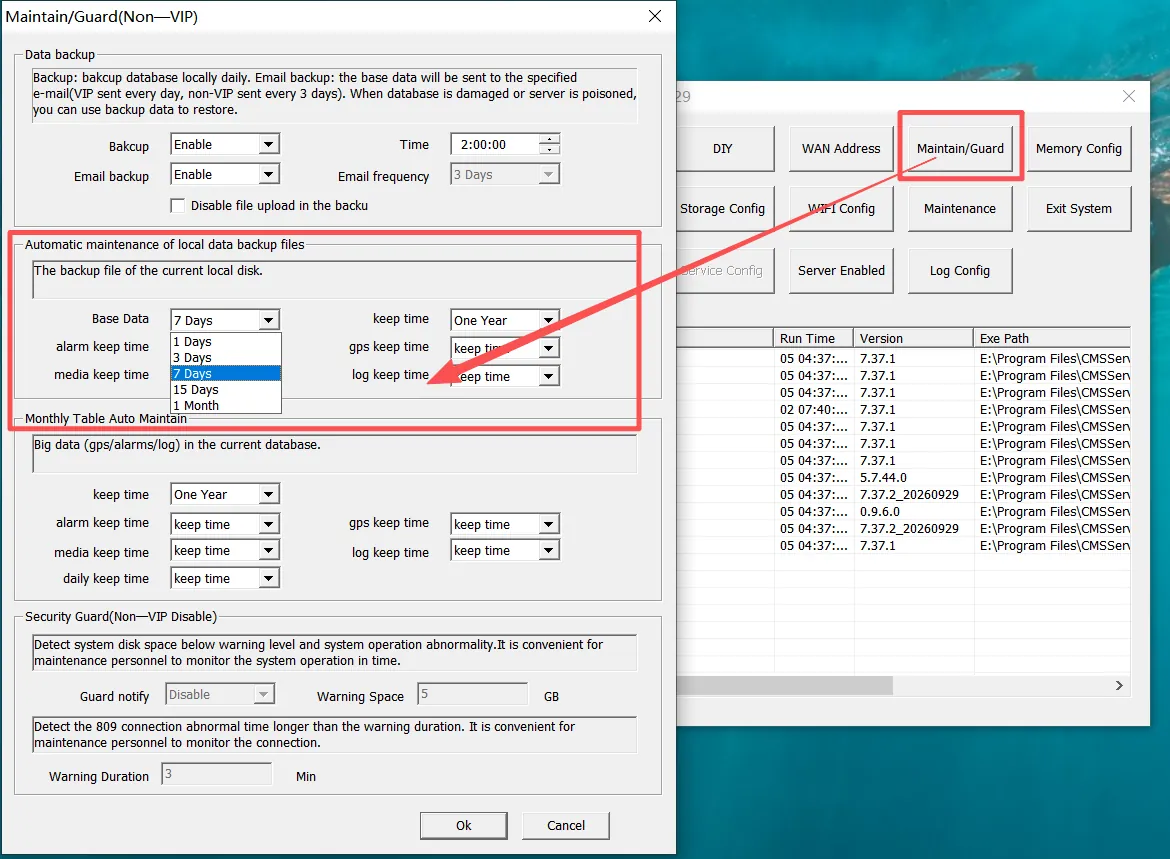
Note: The initial installation and deployment will have a default configuration duration:
Local Data Backup File The default retention period for translated auto-backup data is 7 days for basic data and half a year for big data.
Realtime Database Monthly Table File The automatic maintenance retention time is 1 year by default.
2, operating instructions
2.1 Automatic maintenance of local data backup files
Here you can set the retention period for basic data and big data in local backup data. Backup data outside the configured retention period will be automatically cleaned up and deleted.
For example, the watchdog server will check whether the MySQL service exists. If it does, it will check the backup files every other day. If June 2026 is not within the backup data retention period, files with the suffix "202606" will be cleaned up and deleted.

Basic data refers to vehicle information, equipment information, company information, user information, role information, etc.
Big data includes GPS track information, alarm information, log information, etc. of the vehicle
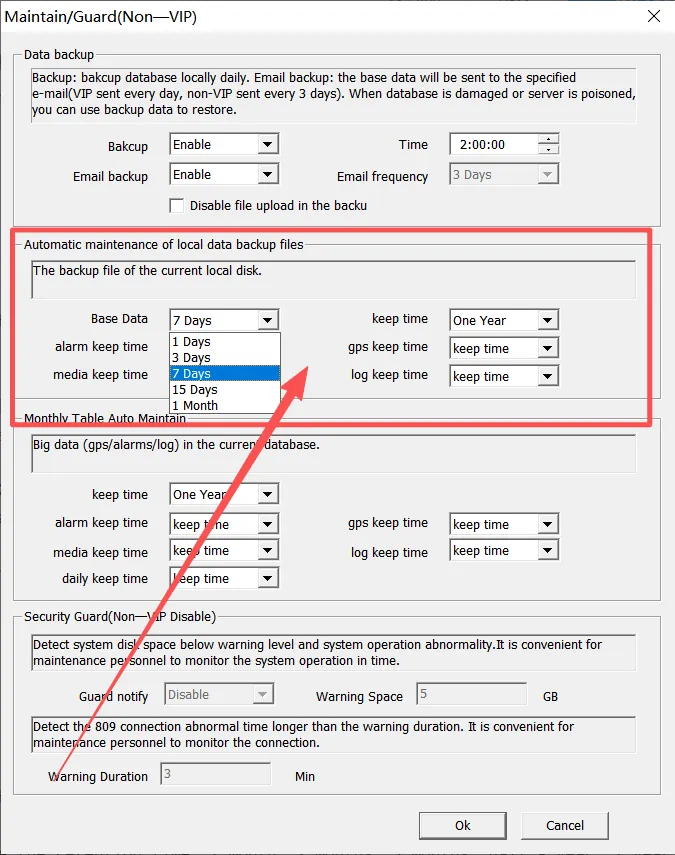
** Basic Data : You can choose 1 day, 3 days, 7 days, 15 days and 1 month;
Retention time: You can choose 1 month, 2 months, 3 months, half a year, 1 year, 2 years, 3 years, 4 years, 5 years, 10 years
Alarm table retention time: You can choose the retention time, 1 month, 2 months, 3 months, half a year, 1 year, 2 years, 3 years, 4 years, 5 years, 10 years
Track Table Retention Time: You can choose the retention time, 1 month, 2 months, 3 months, half a year, 1 year, 2 years, 3 years, 4 years, 5 years, 10 years
Media table retention time: You can choose the retention time, 1 month, 2 months, 3 months, half a year, 1 year, 2 years, 3 years, 4 years, 5 years, 10 years
Log table retention time**: You can select the retention time, 1 month, 2 months, 3 months, half a year, 1 year, 2 years, 3 years, 4 years, 5 years, 10 years
View Backup Data Path Reference Document: https://help.cmsv8.com/helpCenter/docNew/index.html?isStudy=1&pageType=2&docType=4&docId=1857&type=1
2.2 real- time database monthly table automatic maintenance
Here you can set the retention time of the big data (alarm information, vehicle gps track information, log information, etc.) of the platform's real- time database;
The watchdog judges whether there is MYSQL service, and checks whether the monthly table meets the deletion range every other day. within the deletion range, it deletes the table AAAA (year) BB (month) with the table name suffix AAAABB. for example, 202608. the data of the monthly table exceeding the set retention time will be automatically cleaned up, and the cleaned data will not be found on the platform.
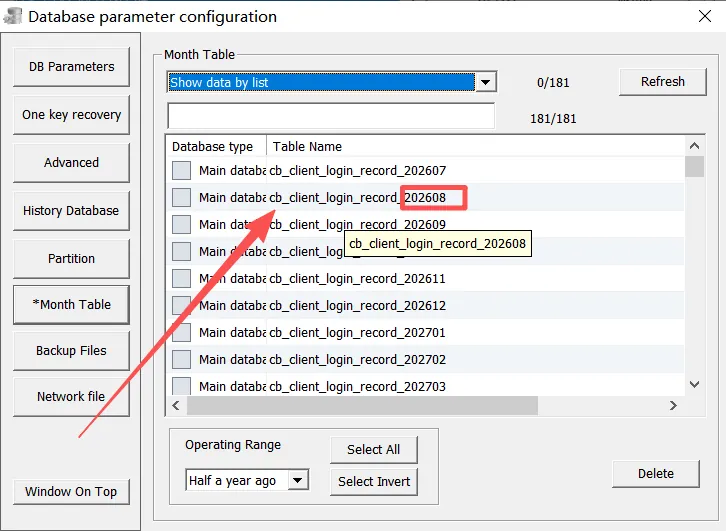
Retention time: You can choose 1 month, 2 months, 3 months, half a year, 1 year, 2 years, 3 years, 4 years, 5 years, 10 years
Alarm table retention time: You can choose the retention time, 1 month, 2 months, 3 months, half a year, 1 year, 2 years, 3 years, 4 years, 5 years, 10 years
Track Table Retention Time: You can choose the retention time, 1 month, 2 months, 3 months, half a year, 1 year, 2 years, 3 years, 4 years, 5 years, 10 years
Media table retention time: You can choose the retention time, 1 month, 2 months, 3 months, half a year, 1 year, 2 years, 3 years, 4 years, 5 years, 10 years
Log table retention time: You can select the retention time, 1 month, 2 months, 3 months, half a year, 1 year, 2 years, 3 years, 4 years, 5 years, 10 years
Daily Report Retention Time: You can choose the retention time, 1 month, 2 months, 3 months, half a year, 1 year, 2 years, 3 years, 4 years, 5 years, 10 years
2.3 database table description
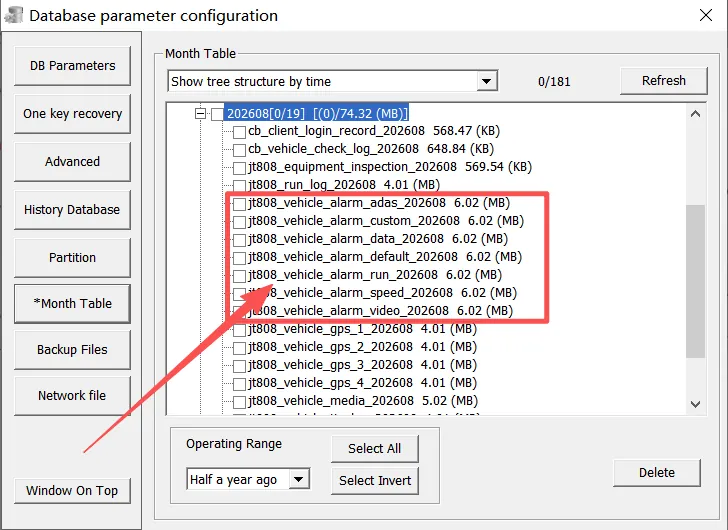
2.3.1 Alarm Table: jt808_vehicle_alarm_TYPE_YYYYYMM
Used to store vehicle alarm data
TYPE:
default - - all other alarm type data
run - - operation alarm data, such as temperature alarm, ACC on alarm, oil quantity alarm, etc.
speed - - Speed alarm data, such as overspeed alarm, area overspeed alarm (platform), etc.
video - - video alarm data, such as video signal loss alarm, video signal occlusion alarm, etc.
adas - - active safety alarm data, such as answering and calling alarm, smoking alarm, distracted driving alarm, etc.
custom - - stores the data collected by the driver's identity and the data in the superior platform report
data - - Transparent data reported by the storage device
YYYYYMM- Month Year
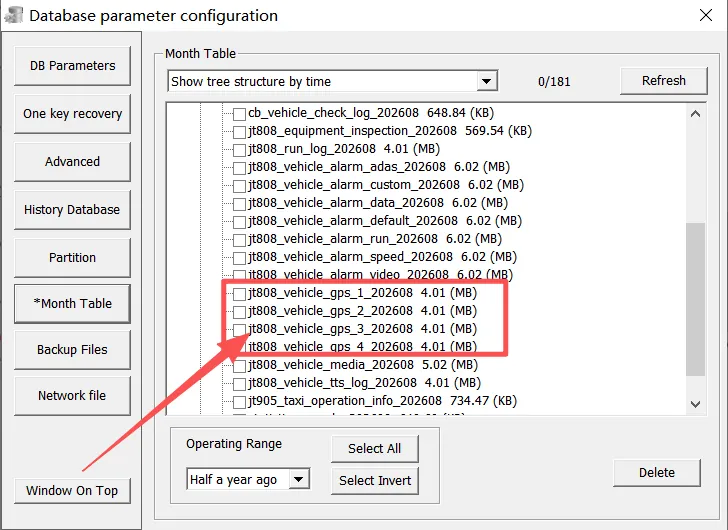
2.3.2 Track Table: jt808_vehicle_gps_N_YYYYYMM
Used to store vehicle GPS trajectory data
N:{1,2,3,4}
YYYYYMM- Month Year
The storage location of the vehicle is determined according to the license plate ID jt808_vehicle_info in the vehicle information table and the generation time of the vehicle data.
** Calculation Method **: If the ID value is divided by 4, the remaining 0 is stored in gps_4, the remaining 1 is stored in gps_1, the remaining 2 is stored in gps_2, and the remaining 3 is stored in gps_3
For example, in table jt808_vehicle_info, ID = 119, VehilDNO = 10119,ID = 119/4+3, so the GPS information of the device in August 2026 is stored in table jt808_vehicle_gps_3_202608
2.3.3 Media Table: jt808_vehicle_media_YYYYYMM
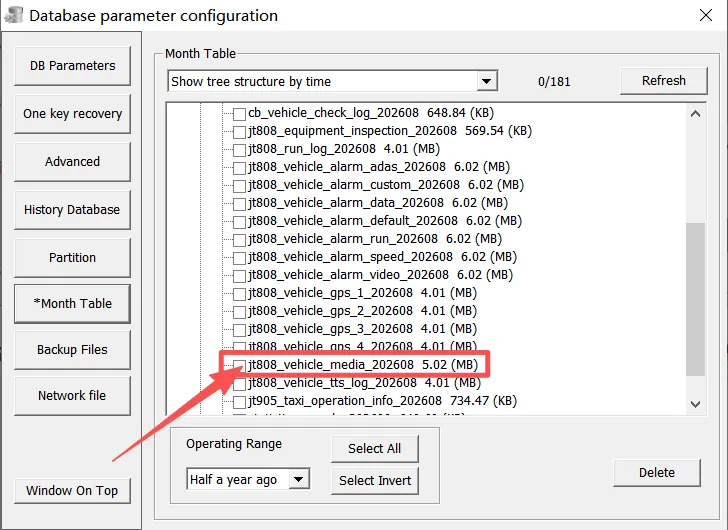
Used to store the vehicle's time- lapse video, capture photos and other data
YYYYYMM- Month Year
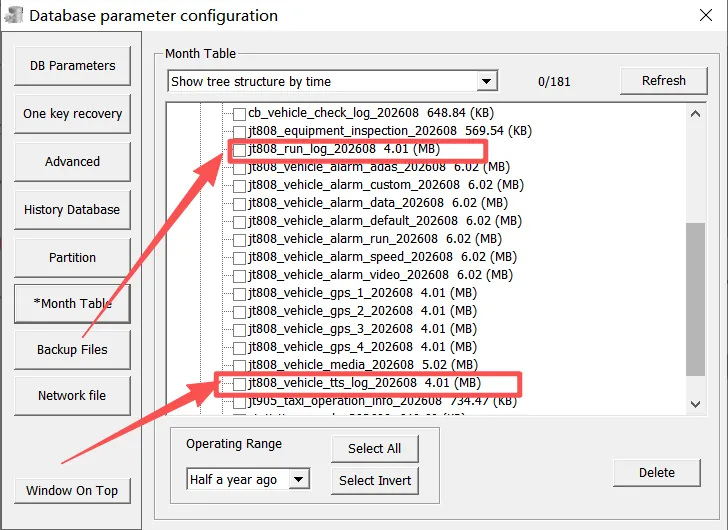
2.3.4 Log Table: jt808_run_log_YYYYYMM,jt808_vehicle_tts_log_YYYYYMM
Used to store data such as vehicle equipment communication interaction flow, multimedia data packets and tts text messages
YYYYYMM- Month Year
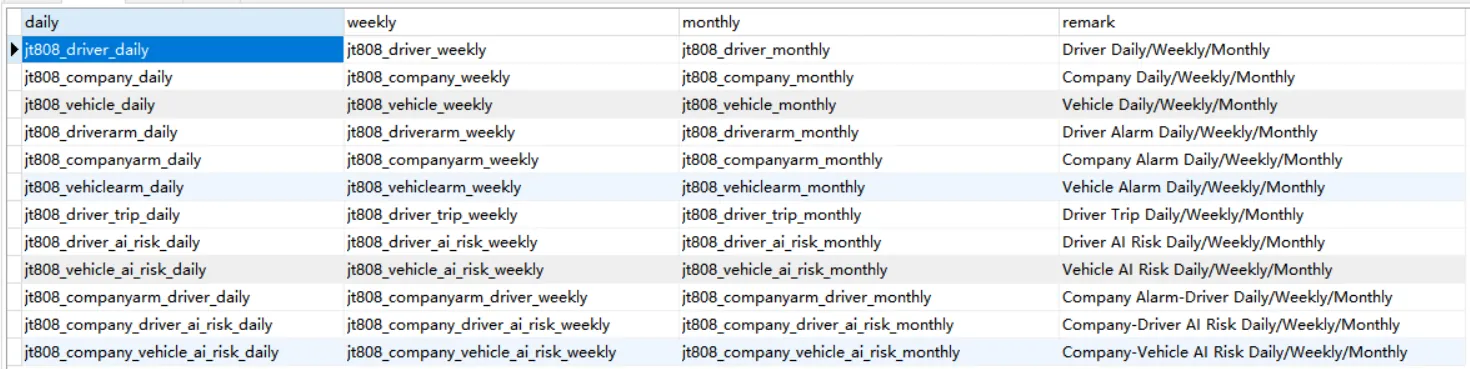
2.3.5 Daily Report: Includes daily reports for vehicles,companies,drivers,Daily Reports --daily,Weekly Reports --weekly,Monthly Reports --monthly
Used to store business summary and details of daily cycle statistics of vehicles/companies/drivers