1、 function description
Fuel Quantity Probe Enable
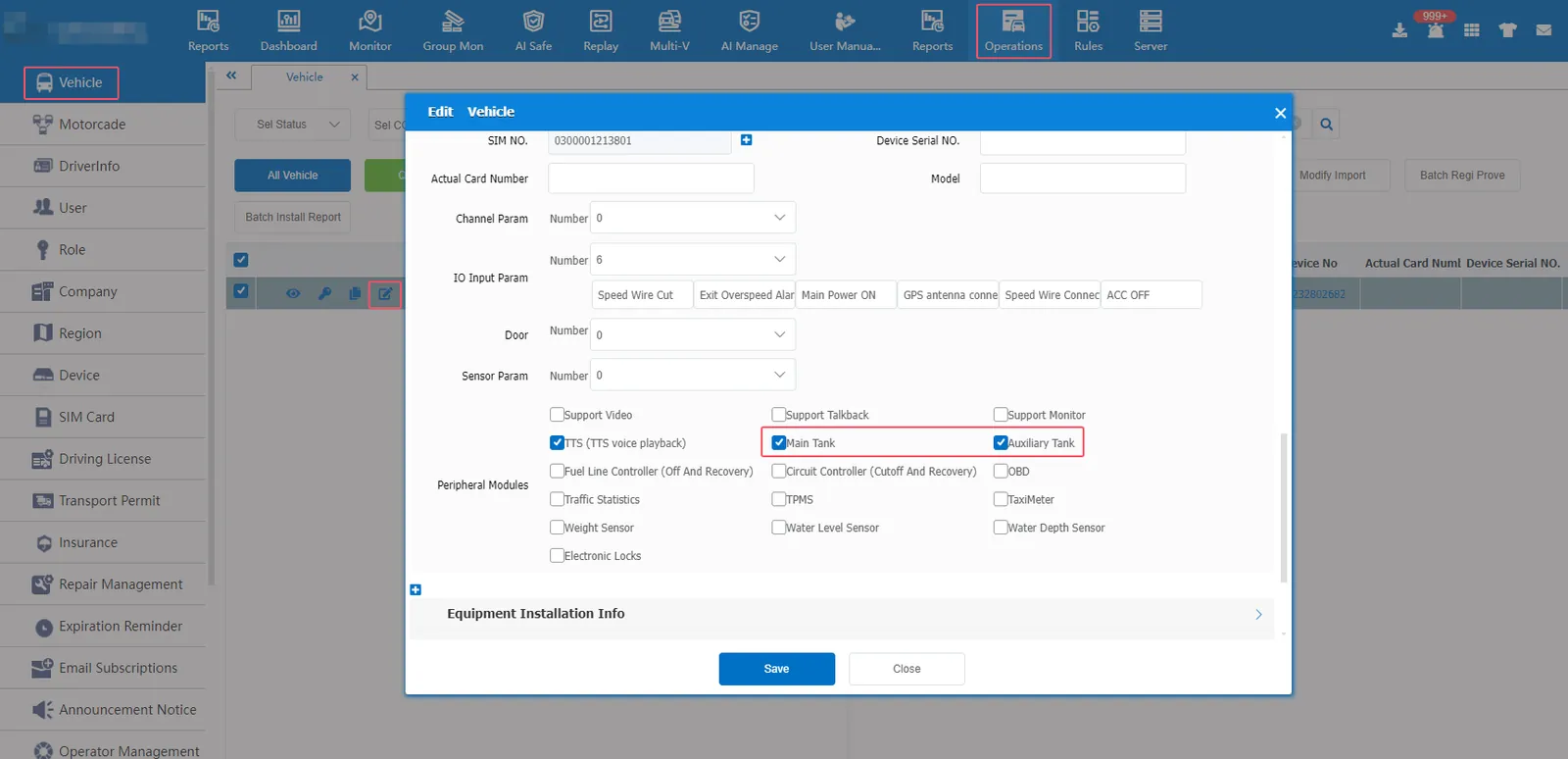
1.1 If the equipment directly transmits the fuel value to the server, it only needs to check the main fuel tank (auxiliary fuel tank) in the vehicle information of the platform. If the equipment transmits the analog value of the oil quantity, it needs to configure the oil quantity sensor value additionally.
1.2 Department Standard Agreement- Fuel Expansion Agreement
Protocol for equipment to upload oil quantity through position information (0x 0200)
| Protocol Type | Additional ID | Data Type | Description |
|---|---|---|---|
| Standard Protocol | 0X02 | WORD | Unit: 1/10L, corresponding to the reading of the fuel gauge on the vehicle (equipment transmission value 100 means 10L) (range 0- 2000L) |
| HB protocol | 0XCE | WORD | unit: l, corresponding to the reading of the fuel gauge on the vehicle (the equipment transmission value 100 represents 100L ) (range 0- 17000L) the web interface needs to check operation management- > vehicle information- > equipment information- > peripheral module- > water level sensor |
| HB Protocol | 0X50 | WORD | Data: 683F Oil Quantity Display: 266.87L Unit: 1/100L |
| Fang Hao liquid level | 0XB1 | CHAR[3] | liquid level height (MM) |
| SUBEI COMPANY | 0XE2 | DWROD | PERCENT |
| BSJ Protocol | 0XEB | CHAR[10] | Percentage |
| auxiliary fuel tank (second way) | 0xEC | WORD | (auxiliary) fuel quantity unit is 1/10L |
BSJ Protocol Example: EB 0A 00 08 0023 31 32 2e 33 34 30
0xEB = BSJ Extended Protocol
eb 19 00 08 00 23 30 35 30 2e 32 34 00 08 01 04 30 32 33 2e 39 38 00 03 00 d4 00
[EB] Additional Information ID [19] Additional Information Length
0xEB = BSJ Extended Protocol
[0008] Length: 8
[0023] Instruction: 35
Oil level sensor with communication
[3035302E3234] Oil level percentage = 50.24 (L)
[0008] Length 2:8
[0104] Instruction 2:260
Fuel level sensor of auxiliary fuel tank
[3032332E3938] Oil level percentage = 23.98 (L)
[000300D400] Reserved BYTE[5]
2、 operating instructions
2.1 Vehicle Information- Equipment Information Check Main Fuel Tank (Sub Fuel Tank)
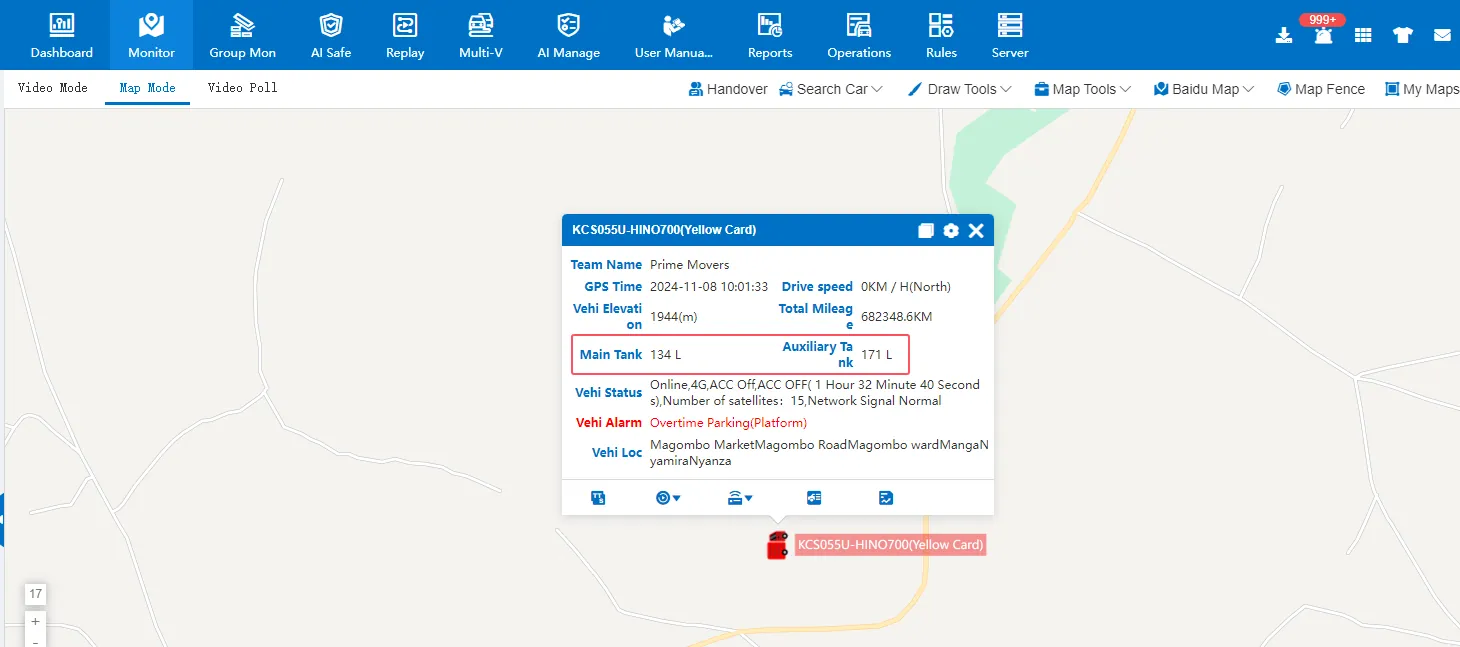
2.2 As long as the equipment transmits the fuel quantity data to the platform according to the relevant expansion protocol, the fuel quantity value will be displayed in the vehicle status bubble box (the fuel quantity value at this time may not be the real fuel quantity value)
2.3 Set the fuel quantity sensor value (the fuel value transmitted by the equipment is not the real fuel value, but the analog value)
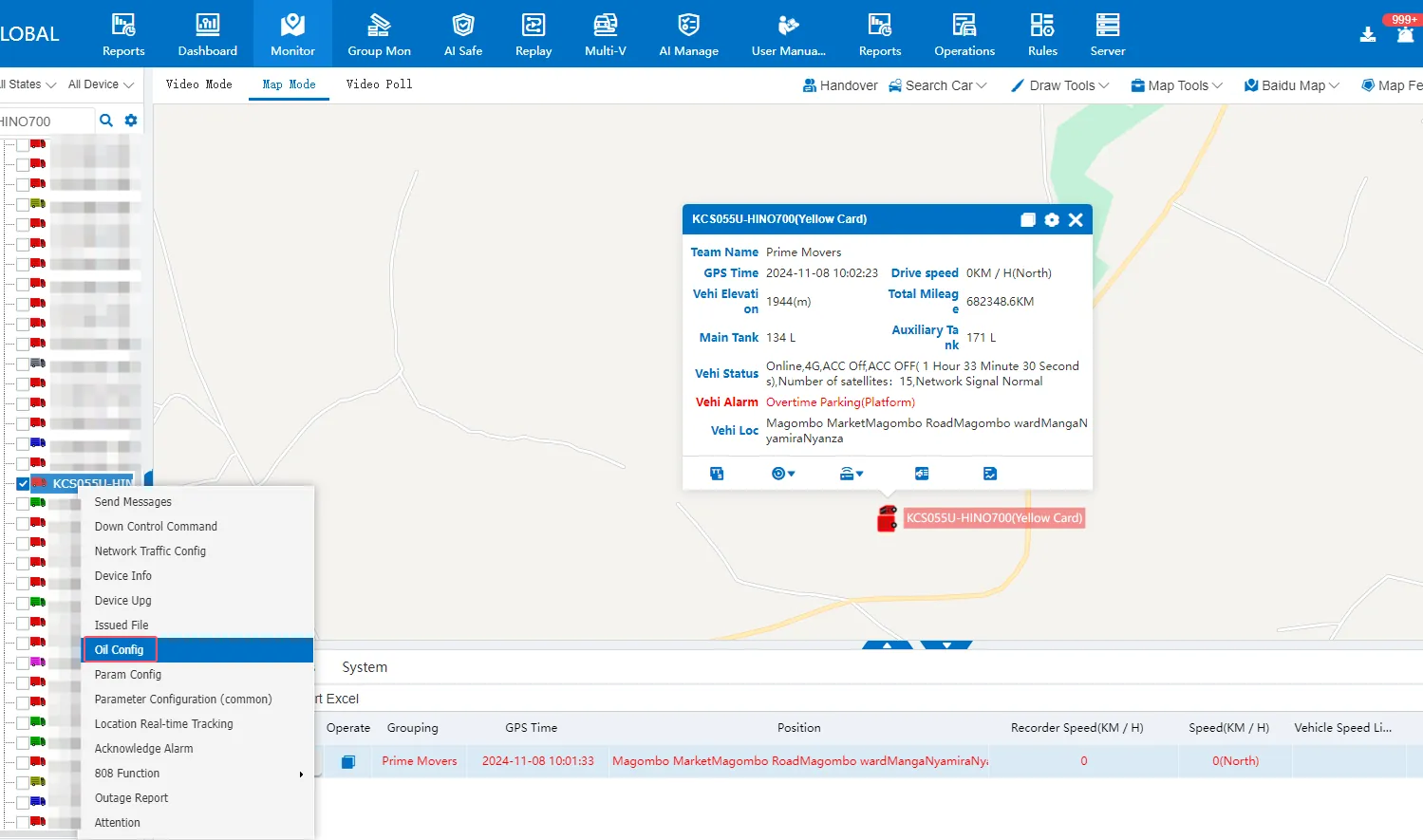
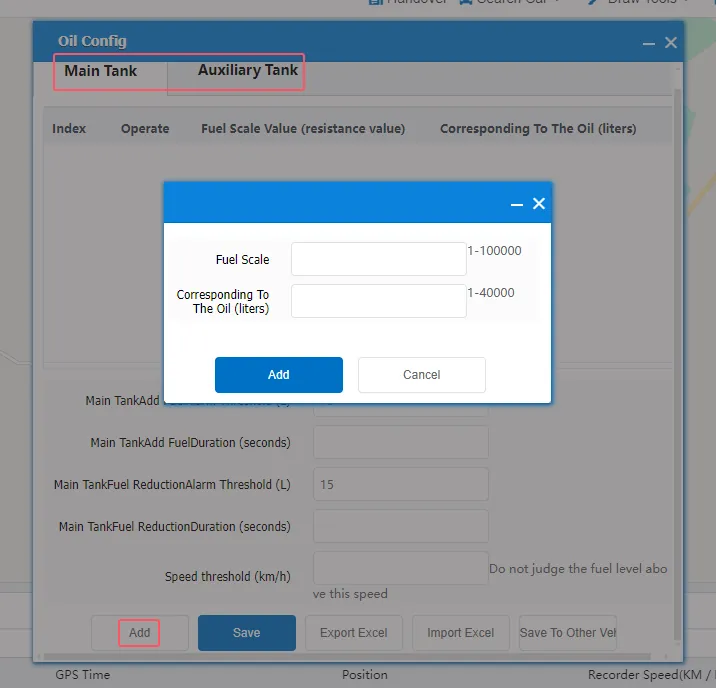
The fuel quantity sensor value has not been configured. The fuel quantity value displayed in the platform vehicle status bubble box is actually the fuel quantity scale value (analog value). Use an extra notebook to record the fuel quantity scale value (analog value) and the actual fuel quantity in the fuel tank at this time. If the fuel tank is a regular fuel tank, configure a set of proportional values. If it is an irregular tank, it is necessary to configure multiple sets of proportional values.
For example:
Oil quantity scale: 100/corresponding oil quantity (liter):1000
Oil quantity scale: 120/corresponding oil quantity (liter):1500
Oil quantity scale: 140/corresponding oil quantity (liter):2000
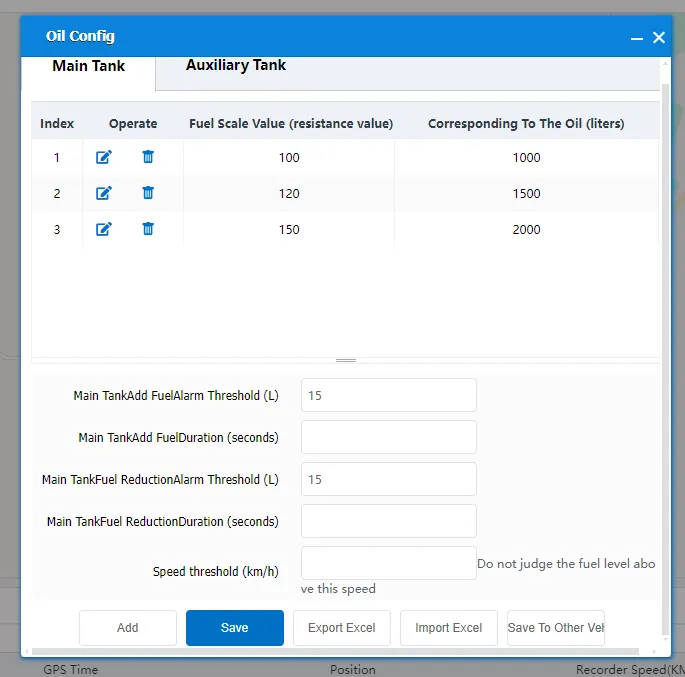
After the configuration is completed, click Save, and then the fuel value displayed in the platform vehicle state bubbling box will be converted into the real fuel value according to the proportional algorithm.
2.4 Set the fuel level alarm threshold (trigger the platform's refueling alarm and fuel level reduction alarm)
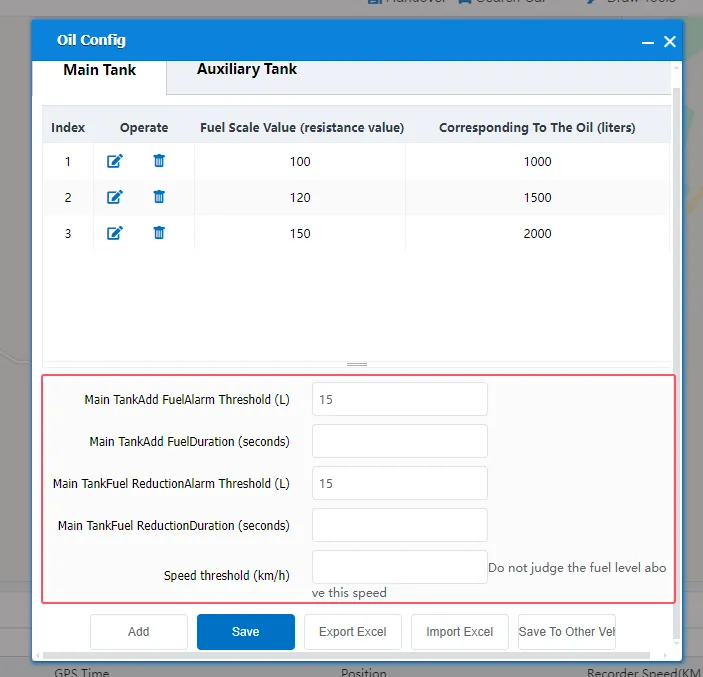
For example:
Main Tank Refuel Alert Threshold (L):2
Main tank refueling duration (seconds):10
That is to say, if the amount of fuel transferred from the equipment to the platform exceeds 2 liters within 10 seconds, a refueling alarm will be triggered.
3、 Precautions
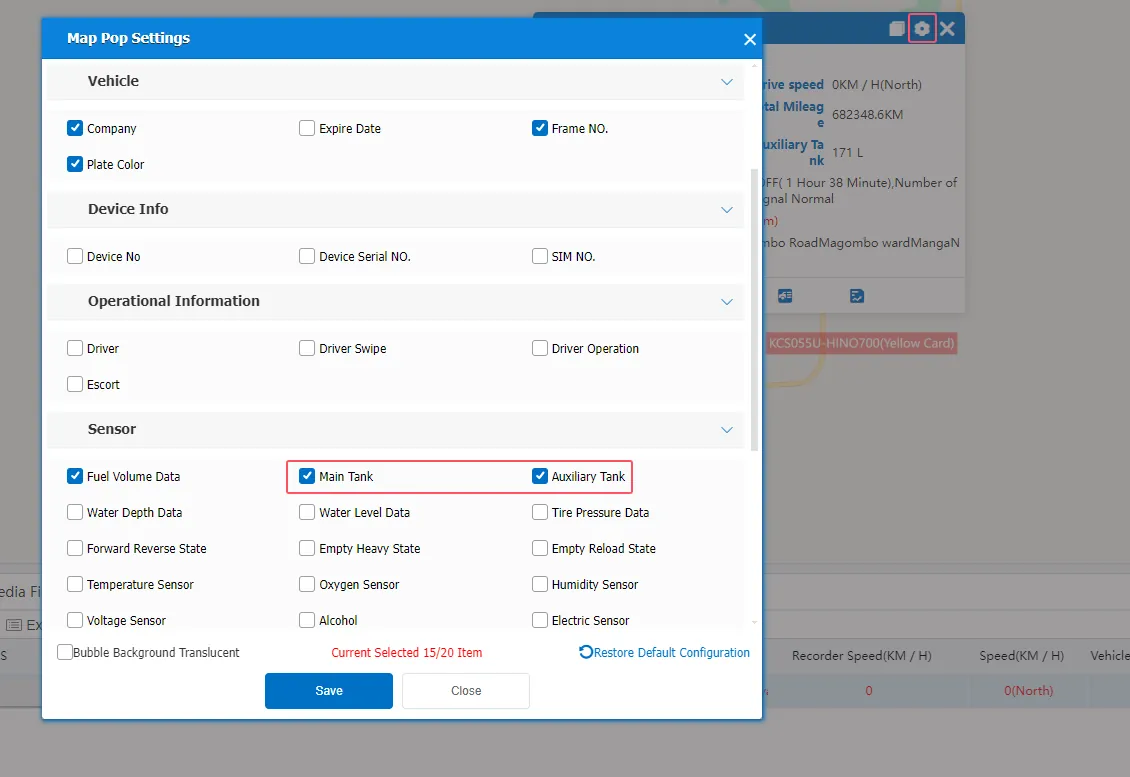
If the equipment transmits the fuel quantity data to the platform according to the relevant expansion protocol, but the vehicle status bubble box is not displayed, you can check whether the main fuel tank (auxiliary fuel tank) is checked in the bubble setting of the map.