1. Function description
- Network hard disk storage has the advantages of large space, good security and low cost, which solves the problems of server disk space, bandwidth and data security, and can save media files directly to computers in different places.
2. operating instructions
2.1 Manually configure network disk mapping (verification phase)
-
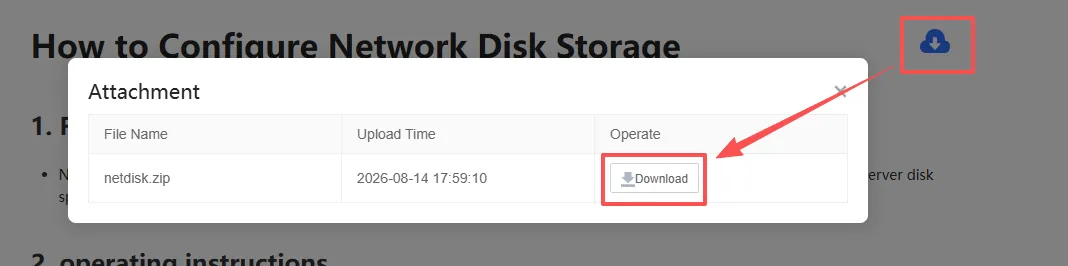
In the upper right corner of this document, download the attachment
netdisk.zip, extract thenetdisk.batfile and put it on the server.
-
Modify the mapping parameters in the netdisk.bat file according to the formal environment.
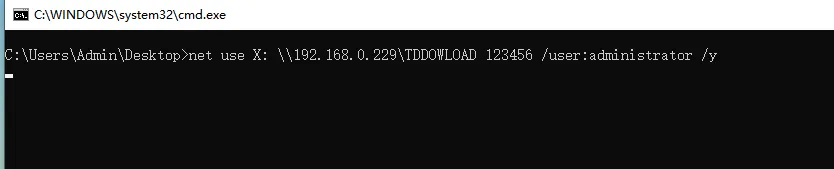
Mapping command:net use 'drive': \\'IP'\'file name' 'password' /user:'user name' /y
Mapping example:net use X: \\192.168.0.229\TDDOWLOAD 123456 /user:administrator /y
"X": drive letter to be mapped to the local machine (the drive letter must not conflict with the existing drive letter of the system)
"192.168.0.229": network disk IP address (IP address is used, domain name address is not allowed)
"TDDOWLOAD": network disk folder name
"123456": the password of the computer on the network disk (if the network disk does not have a password, try to keep it consistent with the remote password of the server)
"administrator": user name of the network disk computer (if the network disk does not have a user account, you can try to use the administrator)
-
After modifying the mapping parameters according to the formal environment, double- click to execute the' netdisk.bat file'
-
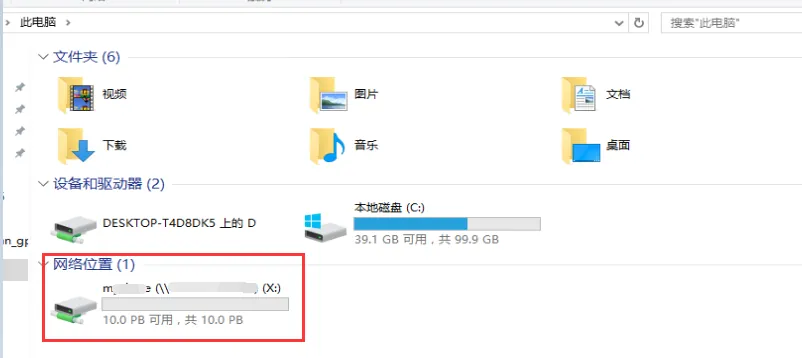
Check whether the network disk is successfully mapped (as shown in the following figure)
-
If the mapping is unsuccessful, check your network disk sharing and configuration, and perform the operation again. If the mapping is successful, Disconnect the network disk and formally configure the storage server parameters.
2.2 configuration of storage server parameters (formal mapping of network disk)
After the manual mapping is successful, Disconnect the network disk and configure the server parameters to connect to the network disk according to the following steps.
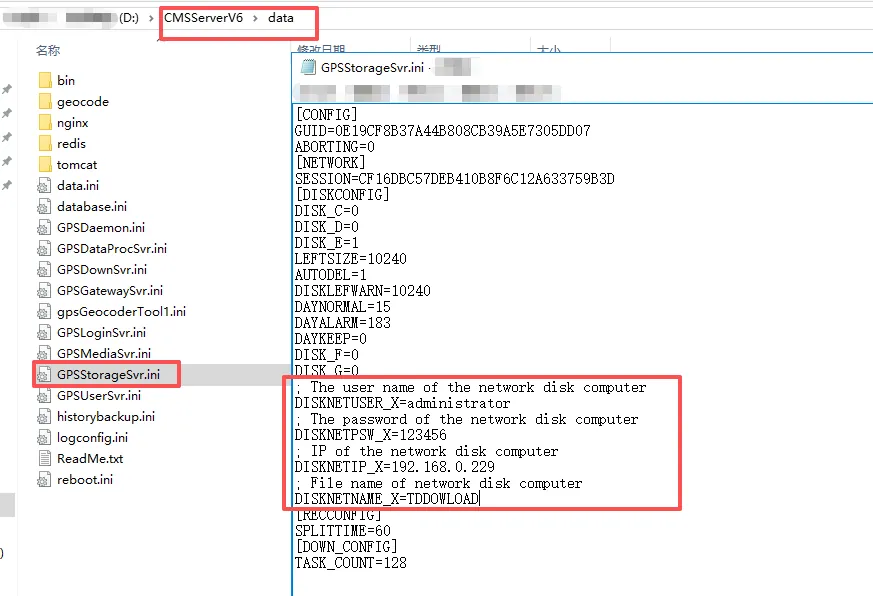
Open the GPSStorageSvr.ini configuration file in the server installation directory and add the following parameters:
[DISKCONFIG]
; The user name of the network disk computer
DISKNETUSER_X=administrator
; The password of the network disk computer
DISKNETPSW_X=123456
; IP of the network disk computer
DISKNETIP_X=192.168.0.229
; File name of network disk computer
DISKNETNAME_X=TDDOWLOAD
- If the download server uses a network disk, disconnect the network disk at one point and do not add the network disk manually, otherwise the server will not recognize the network disk, which will affect the download server and the storage server.
3. Precautions
- a. Confirm whether X disk exists
- b. First test whether the network disk provided by the customer can be mapped
- c. Disconnect the manually mapped network disk
- d. Configure the network disk of the storage server
It is not recommended to use the domain name address for the network disk address. Version 7.24 is through log GPSStorageSvr----libdiskmgr found that the domain name is incomplete.
