1、 function description
Applicable to 7.24 version (including) above the server software.
2、 operating instructions
2.1 28181 Device Preview Video New Port Configuration
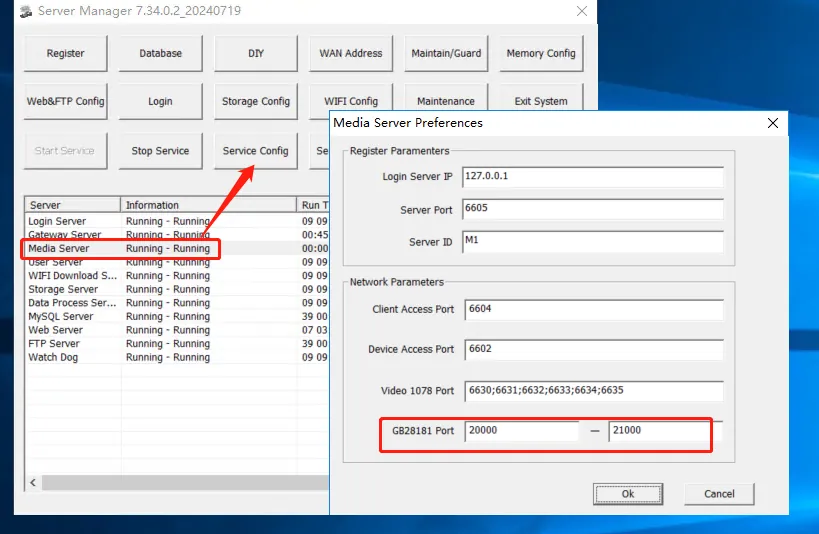
2.2 the server console, select the streaming media server, click the service configuration, add the GB28181 video port, and add the corresponding TCP/UDP port mapping when using it.
3、 Precautions
3.1 Here, one port corresponds to one video channel (the corresponding port range is configured according to the actual situation, and the system defaults to 20000- 21000);
3.2 28181(2011) This is UDP;28181(2016) This is TCP, so the TCP and UDP of the configured ports are uniformly opened;
3.3 the port mapping detection here needs to be carried out when there is a preview video before it is turned on (the port mapping of the relevant ports is indeed done);
3.4 the ports here are used in order, not randomly (for example, 20000 to 21000; It is occupied from 20000 port and then in order);
4、 Frequently Asked Questions
Question 1: The corresponding port mapping has been added, but the telnet test 20000 port fails
Answer: Confirm whether the video channel of the 28181 device is opened on the platform, and then you can use telnet test.